
 0345 363 1130
 info@xchangetraining.co.uk


Adobe Lightroom Introduction - Manchester
Level:
Introduction
Duration:
1
Day - 10am to 5pm
Price:
£299 + vat
Find out how to gain more control over your photos as we get to grips with this powerful image-manipulation program. Learn the tricks to adjust and develop compositions like a professional. A great course for Photoshop users with a keen interest in digital photography.
After we guide you through the essentials of controlling the Lightroom environment, we will show you how to import and adjust images, add metadata, and prepare your output for the web and for print. Join us and add some sparkle to your compositions. Our course provides the perfect way to improve your image workflows and to add to your existing knowledge of Photoshop.
Find out how to gain more control over your photos as we get to grips with this powerful image-manipulation program. Learn the tricks to adjust and develop compositions like a professional. A great course for Photoshop users with a keen interest in digital photography.
After we guide you through the essentials of controlling the Lightroom environment, we will show you how to import and adjust images, add metadata, and prepare your output for the web and for print. Join us and add some sparkle to your compositions. Our course provides the perfect way to improve your image workflows and to add to your existing knowledge of Photoshop.
-
Lightroom Introduction
Course Details
This 1-day Introduction course helps you learn about the tools and features available in Adobe Photoshop Lightroom. We will help you understand how this powerful program takes Photoshop's image-manipulation capabilities to a new level.
We will guide you in learning the work area and then move on to show you how to import, process, manage, and showcase images.
Upon successful completion of this course, you will be able to:
- Navigate the Lightroom environment
- Import and organise images
- Sort and filter images
- Apply a wide range of image adjustments
- Add metadata and synchronise keywords
- Develop images appropriately
- Prepare images for the web and for print
- Create and customise a web gallery
Our goal is for you to manage and adjust images quickly and effectively.
Course Target Audience and delegate prerequisites:
This course is intended for those who wish to enhance their existing knowledge of Photoshop and who work as digital artists and photographers as well as those who work for advertising agencies, design agencies, marketing agencies, production houses, and specialist corporate departments.
Note that this course is held on Adobe Lightroom (formerly Lightroom CC) rather than Lightroom Classic. While there is much common ground between the two, there are key differences in the way files are managed and located.
You will need basic experience in using Photoshop. Ideally, you will have taken our Adobe Photoshop CC Introduction 2 Day course.
-
Full Course Outline
The following is a general outline. The range of topics covered during your training is dependent upon student level, time available and preferences of your course booking.
Introduction to Lightroom- Overview of Lightroom – why use Lightroom?
- Adjustment Brush
- Collections
- Photography workflow (Lightroom, Bridge & Photoshop)
- Getting to know the work area – Modules
- Basic shortcuts for manipulating workspace
- Customizing Lightroom workspace (Identity plate, preferences)
- File formats supported (intro to DNG)
- Importing Preferences
- Importing images from: Memory Card, a folder on a computer, an external hard drive
- Organizing folders / using Multiple Hard-drives
- Exporting photos from Lightroom
- Navigator
- View modes
- Comparing images
- Working with Folders and Catalogs – creating,
- backing up, exporting, importing
- Quick develop adjustments
- Adjusting White Balance
- Temperature / Tint and Tone Control.
- Star rating
- Quick Collection
- Smart Collections
- Stacking
- Renaming
- Keywording images
- Grouping keywords into sets
- Synchronizing keywords
- Filtering
Exporting images- Export images settings
- Editing images in an external application (Photoshop)
- Exporting images to Photoshop as Smart Objects and creating panoramas.
- Using Presets
- Using Histogram the right way
- Adjusting White Balance and Tone, Cropping / Straightening images
- Removing dust and red eyes on the images
- Graduated Filter (New in Lr2.0!)
- Adjustment Brush – settings and usage
- Image adjustments using Curves, HSL / Color Black and White Conversion
- Using the Detail Panel to deal with Sharpening, Noise and Chromatic aberrations
- Correcting vignetting
- Camera Calibration Panel
- Adjustments using Develop Module
- Slideshow Module
- Creating slideshows using collections
- Slideshows templates and quick slideshow access
- Customizing the templates and saving as presets
- Exporting slideshows
- Using / customizing templates
- Saving templates
- Creating a Web Gallery (HTML, Flash)
- Customizing it.
- Uploading files
-
Location Details
This course is provided at the XChange Training Manchester training centre based at:
Piccadilly House
49 Piccadilly
Manchester
M1 2APPiccadilly House is located in the heart of Manchester directly next to the Piccadilly Gardens transport interchange with excellent bus and tram connections and is easily accessed from Piccadilly train Station (5 mins). Victoria station is also close by (around 10 mins).
Daily course times run between 10am and 5pm with an hour break for lunch and both mid morning and mid-afternoon refreshment breaks. We recommend arrival at 9.45am for registration on the first day of the course.
View Full details of our Manchester Training Venue and Course options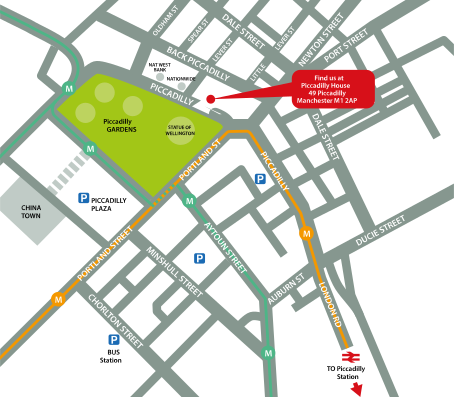
↑ Click the map to view a larger version ↑
View our Manchester Centre Location on Google Maps
-
Lightroom Introduction - Upcoming Manchester Course Dates
09 Oct - 09 Oct £299 + vat 27 Nov - 27 Nov £299 + vat -
Client Reviews
"Loved it, friendly, informative and well worth the time and money..."
Peter Forsyth, Lightroom - 1 Day Introduction
"A great introduction to Light Room which is exactly what I was seeking."
William Carr, Rushton, Lightroom - 1 Day Introduction
"An excellent day which achieved my objectives."
Michael Laurie, Arat Consulting, Lightroom - 1 Day Introduction
"Very helpful course with all the basics covered. I feel confident that I can complete and build and produce quality courses relatively pain free!"
Sian Murphy, Riverside Housing, Storyline - 2 Day Introduction
"Very good and enthusiastic tutor who clearly enjoys the subject, and was very keen to impart his knowledge - very good indeed. Thank you."
Stuart Hill, BGY Architects, SketchUp - 1 Day Introduction
"I thoroughly enjoyed the course. I learnt an awfull lot and feel confident that I will be able to put everything to good use. "
Anthea Denning, Denning Design, QuarkXPress - 2 Day Introduction
"Very good. Covered all the areas I wish to use and more. Look forward to the intermediate course"
Roshni Narsi, ITFC, Microsoft Word - 1 Day Introduction
"The trainer was excellent and the private training worked very well."
Christopher Harris, University of Leeds, Flash - 2 Day Introduction
"The course was well structured and the small class size was great. The tutor managed to tailor it to our needs too which was great."
Jessica Croome, The Creative Clinic, WordPress - 1 Day Advanced
"The instructor was very knowledgeable and patient and went at just the right learning speed for my level. One to one tutorial has been very beneficial for my learning of HTML and CSS and a great introduction."
Dawn Irons, Imago Group plc, HTML and CSS - 2 Day Introduction
 £299 + vat

Next Dates:
 09 Oct £299 + vat
27 Nov £299 + vat
Over 15 years of providing certified Adobe Lightroom training courses UK wide

5/5 Stars
I came in with very little knowledge and Craig gave me a great understanding of all the basics that were needed - he answered all of my questions with a great attitude and had no worries about going over anything extra I needed.
14/03/2025
5/5 Stars
I felt the software was explained in plenty of detail and I feel confident as a result.
16/12/2022
5/5 Stars
Great advice on using other software alongside primary piece of software to make tasks easier and not just sticking to the one package, i.e. Lightroom alongside Photoshop
30/08/2019
5/5 Stars
Very insightful and professional. I am confident that I can now come away from the training and use Lightroom. I would definitely recommend to others!
12/07/2019
5/5 Stars
Chris was happy to direct the learning to my individual needs and was highly skilled and intelligent with great depth of specialist knowledge
12/12/2018
Whats Included:
 Your choice of Windows or Mac
  Certified hands-on training
  Small class size (max 4-8)
  6 months post course support
  Digital Learning Materials
  Authorised Course Certificate
Frequently Asked Questions
What are the course times?
For all courses in the Manchester Centre the normal session timings are 10am to 5pm with an hour break for lunch. In addition to the hour lunch break there are also two fifteen minute coffee breaks mid morning and mid afternoon.
Daily times are:
09.45 - Registration
10.00 - Course start
13.00 - Lunch
14.00 - Afternoon starts
17.00 - Course ends
Do you offer discounts
or promotions?
We offer a range of regular discounts available for self funding individuals, charities and education along with period special offers. See our promotions page for full details.
What is provided with this course?
During the course we provide all computers for your use with choice of Windows or Mac, lunch and refreshments along with pads & pens. After the course you will receive the authorised Certificate, quality reference manual and 6 months direct post course support.
Does this course give
a qualification?
Although this course does not provide an actual qualification each delegate is provided with an official Certificate for completion of the course level.
Can you invoice my company?
In short yes we can provide 30 day invoice terms to any UK Limited company with the provision of your official purchase order and/or completing the invoice request for your booking online.

Adobe Design Ready in just 5 days!
Learn Adobe Design skills with our value Adobe Design Masterclass Bundle →