
 0345 363 1130
 info@xchangetraining.co.uk


Adobe InDesign CC Advanced with ACP Exam 3 Days - London
Level:
Advanced
Duration:
3
Days - 10am to 5pm
Price:
£650 + vat
Join the professionals in getting the best out of the world's leading desktop-publishing program. Our course will show you how to unlock the power of InDesign's advanced tools and help you to become more proficient and confident in laying out documents. Pass the ACP exam and get qualified!
With our help, you will take your existing InDesign know-how and enhance it as you learn how to create interactive PDFs, eBooks, and more. We will show you how to work more efficiently by saving re-usable data and storing PDF presets. This course is a great way to step up to expert level by increasing the quality, consistency and speed of your output. You will test your new skills as you take the ACP exam.
Join the professionals in getting the best out of the world's leading desktop-publishing program. Our course will show you how to unlock the power of InDesign's advanced tools and help you to become more proficient and confident in laying out documents. Pass the ACP exam and get qualified!
With our help, you will take your existing InDesign know-how and enhance it as you learn how to create interactive PDFs, eBooks, and more. We will show you how to work more efficiently by saving re-usable data and storing PDF presets. This course is a great way to step up to expert level by increasing the quality, consistency and speed of your output. You will test your new skills as you take the ACP exam.
-
InDesign Advanced with ACP 3 Days
Course Details
This 3-day Advanced course will help to develop your skills as you explore the advanced features of Adobe InDesign CC. We will help you understand how this industry-leading program takes desktop publishing and design to a new level, and combines production power and creative freedom with tight integration with Photoshop, Illustrator, and Acrobat software.
You will already understand the basics of the program, and we will show you how to take that knowledge to the next level. We will cover advanced topics such as creating eBooks, generating indexes, and automating workflows.
Upon successful completion of this course, you will be able to:
- Create complex documents such as interactive PDFs and eBooks
- Use advanced tools and palettes
- Re-use data via libraries and snippets
- Generate tables of contents and indexes
- Store PDF presets
The final day of the course is dedicated to the Adobe Certified Professional (ACP) InDesign exam, including trying a mock exam, reviewing answers, and then taking the real exam. The ACP exam represents an official qualification, and you will be provided with an instant pass or fail result. We are confident that you will join everyone we have already helped to pass the exam and collect an official certificate of Adobe Certified Professional status.
As well as giving you the opportunity to take the ACP exam, this course is the perfect preparation if you plan to take the Adobe Certified Expert (ACE) exam.
Our goals are for you to understand the advanced features of InDesign, to become a confident power user, and to leave with an ACP qualification under your belt.
Course Target Audience and delegate prerequisites:
This course is intended for those who wish to enhance their existing knowledge of InDesign and who work as graphic designers, creative professionals, print professionals, publishers, pre-press professionals, or marketing communications professionals.
You will need basic experience in using InDesign. Ideally, you will have taken our Adobe InDesign CC Introduction 2 Day course.
-
Full Course Outline
The following is a general outline. The range of topics covered during your training is dependent upon student level, time available and preferences of your course booking.
Managing Your Workspaces- Organising Your Panels
- Advanced Zooming and Navigation
- Advanced View Options
- Typographical preferences
- Advanced Character formatting options
- Advanced Paragraph formatting options
- Review of setting up Style Sheets
- Advanced Style Sheet Tips
- Nested Styles
- Using ‘Based on’, ‘Next Style’ and Quick Apply
- Review of setting up Parent Pages
- Parent & Child masters
- Overriding Parent Page items
- Using ‘Shuffle’ options
- Best practice with Parent pages
- Numbering and Section options
- Advanced Align options
- Using keyboard shortcuts for align and distribute
- Using the Gap tool
- Using Autofit for images
- Review of setting up Object Styles
- Setting up a Baseline Grid
- Creating custom frames and objects with the pen tool
- Review of Swatches – managing colours and gradients
- Creating Mixed Inks
- Using the Ink Manager
- Sharing Swatches between documents and with Photoshop and Illustrator
- Using Libraries and Snippets
- Creating Templates
- Creating and using Find/Change queries
- Creating a Table of Contents
- Using an InDesign ‘Book’ to collate documents
- Setting up Indexes
- Tables
- Setting up Tables
- Importing Excel & Word tables
- Creating Table and Cell styles
Creating an interactive PDF- Adding Hyperlinks, Buttons, Movies and Sounds
- Setting up Page Transitions
- Exporting an Interactive PDF
- Understanding what an e-book is
- Overview of preparing an existing file to become an e-book
- Overview of Export options
- Understanding InDesign preferences
- Changing document preferences
- Changing application preferences
- Using the Overprint Preview and the Separations Preview panel
- Defining the Transparency Flattener settings
- Using Preflight
- Understanding an RGB workflow
- Creating PDF presets
- Work through exam preparation sheet
- Sample Exam questions
- Take Practice exam
- Any other questions?
- InDesign ACP Exam
- Instant Pass or Fail Result
-
Location Details
This course is provided at the XChange Training London training centre based at:
5 St John’s Lane
Clerkenwell
London
EC1M 4BHSt John’s Lane is located in the heart of Clerkenwell close to the junction of Farringdon and Clerkenwell Road. Farringdon tube & train station is just a few minutes away and the training centre can also be accessed from Chancery Lane and Barbican tubes in about 10 minutes. There is also easy direct access by bus from Waterloo (243) and West End (55) with nearby stops.
Daily course times run between 10am and 5pm with an hour break for lunch and both mid morning and mid-afternoon refreshment breaks. We recommend arrival at 9.45am for registration on the first day of the course.
View Full details of our London Training Venue and Course options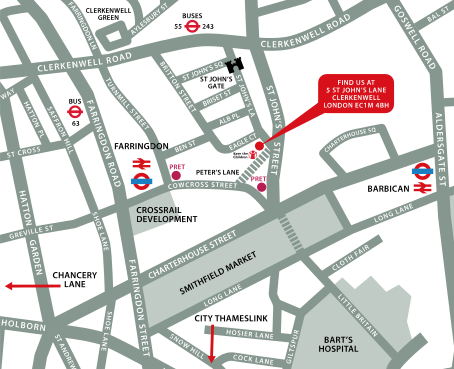
↑ Click the map to view a larger version ↑
View our London Centre Location on Google Maps
-
InDesign Advanced with ACP 3 Days - Upcoming London Course Dates
25 Nov - 27 Nov £650 + vat 27 Jan - 29 Jan £650 + vat 07 Apr - 09 Apr £650 + vat 16 Jun - 18 Jun £650 + vat 18 Aug - 20 Aug £650 + vat -
Client Reviews
"Having no previous experience with InDesign, I felt that the course content was brilliant at introducing me to the program and building my confidence."
Abi Griffin, InDesign Introduction - 2 Days
"Clear, easy to follow training, well paced and interactive with positive tutition. Interesting and enjoyable, would recommend."
Emma Fullalove, Tom Parker Ltd, InDesign - 2 Day Introduction
"Very in-depth and thorough training for people completely new to the program. Covers everything you'd need to know at a very reasonable pace."
Andy Porter, Breaking Free Online, InDesign Introduction - 2 Days
"Brilliant two days. I was sceptical about how much we would learn in two days but now feel like I am definitely ready and eager to use InDesign on my own. The facilities were great and the class size perfect and it is brilliant that we receive a book to help us through post-course use of the software. Nice relaxed atmosphere. "
Emma Bedford, Wem Town Hall Trust, InDesign - Two Day Introduction
"A thoroughly fun and enjoyable course delivered by an enthusiastic and knowledgeable tutor - can't wait to get back into the office environment and put it all into practice!"
Katrina Gillespie, Vinci Academy, InDesign - 2 Day Advanced
"Thanks for a very pleasant and educational 2 days. I think it was especially good because it was a small class which gave very individual training."
Nigel Hopwood, Jacob Jensen Design, InDesign - 2 Day Advanced
"Trainer was very knowledgeable and professional - good amount of bespoke content covered."
Victoria Portwin, Gottex, InDesign - 1 Day Bespoke
"An outstanding training course led by a very knowledgeable and insightful tutor. Thoroughly enjoyed my time and will take forward all new knowledge to my workplace and personal life too. Really enjoyed this, thanks very much!"
Emma McLean, University of Strathclyde, Adobe InDesign - Two Day Introduction
"Great trainer who gave a fantastic insight in a short period of time. I'm looking forward to doing the advanced session!"
Nader Morsy, New College Manchester, InDesign Introduction - 2 Days
"It was brilliant. I feel like I have learnt so much in 2 days. Our trainer was fantastic and I would love to come back and learn more."
Alex East, ISG, Adobe InDesign - Two Day Introduction
 £650 + vat
Next Dates:
 25 Nov - 27 Nov £650 + vat
27 Jan - 29 Jan £650 + vat
07 Apr - 09 Apr £650 + vat
16 Jun - 18 Jun £650 + vat
18 Aug - 20 Aug £650 + vat
Over 15 years of providing certified Adobe InDesign training courses UK wide

5/5 Stars
Great trainer, great course.
20/10/2026
5/5 Stars
The instructor was very knowledgeable and explained things clearly and patiently. I learnt a lot! Colleagues joining online had some technical issues which did not affect the session but sometimes were not relevant to course learning.
06/10/2026
5/5 Stars
A few moments there was a lot to take in and I got a bit left behind, but when I asked for a recap it was happily provided
06/10/2026

4/5 Stars
Training delivery by Donna was fantastic and the course has really set me up for working in InDesign after having only Photoshop experience. My only negative point is that I found the continual interruptions and clarification requests from another student (Seraphina) really distracting. This was a combination of not listening / following along and an inadequate machine being used to run InDesign. I know the course is for all skills levels, but Donna had to repeat pretty much every instruction. It would be great if a machine spec was provided to attendees to perhaps prevent that aspect going forward. Big thanks to Donna, I'll definitely recommend to the wider team for ongoing skills building!
06/10/2026
5/5 Stars
I really enjoyed the course and found it both informative and engaging. Donna delivered the content in a clear and engaging way, making what could have been a fairly dry subject interesting and accessible. I also picked up some useful InDesign tips and techniques along the way, which was great. Overall, a very worthwhile and enjoyable learning experience.
23/09/2026
5/5 Stars
I really enjoyed the course. Having no background in InDesign, I feel confident in using the application now. Doug's expertise and experience as a graphic designer really helped to understand the different tools and their utility. I could always ask questions, everything was really clear.
08/09/2026
5/5 Stars
Phil was excellent, very friendly and knowledgeable. The course was interesting, and gave very useful insights into Indesign.
08/09/2026
5/5 Stars
Really relaxed environment and insightful. Felt comfortable to ask questions and the pace of learning was good.
08/09/2026
4/5 Stars
Very very helpful especially for learning about shortcuts within indesign
07/09/2026
5/5 Stars
Phil was excellent and very passionate about the subject, patient and helpful. I wish I could have done the second day but my company's budget wouldn't allow!
07/09/2026
Whats Included:
 Your choice of Windows or Mac
  Certified hands-on training
  Small class size (max 4-8)
  6 months post course support
  Digital Learning Materials
  Authorised Course Certificate
Frequently Asked Questions
What are the course times?
For all courses in the London Centre the normal session timings are 10am to 5pm with an hour break for lunch. In addition to the hour lunch break there are also two fifteen minute coffee breaks mid morning and mid afternoon.
Daily times are:
09.45 - Registration
10.00 - Course start
13.00 - Lunch
14.00 - Afternoon starts
17.00 - Course ends
Do you offer discounts
or promotions?
We offer a range of regular discounts available for self funding individuals, charities and education along with period special offers. See our promotions page for full details.
What is provided with this course?
During the course we provide all computers for your use with choice of Windows or Mac, lunch and refreshments along with pads & pens. After the course you will receive the authorised Certificate, quality reference manual and 6 months direct post course support.
Does this course give
a qualification?
Yes this course provides you with an official recognised qualification which is the Adobe Certified Professional gained by passing the exam at the end of the course.
Can you invoice my company?
In short yes we can provide 30 day invoice terms to any UK Limited company with the provision of your official purchase order and/or completing the invoice request for your booking online.

Adobe Design Ready in just 5 days!
Learn Adobe Design skills with our value Adobe Design Masterclass Bundle →